
How I Built a Content Automation Workflow to Write Competitor Articles in Hours
When writing competitor articles, I hated the drafts GPT got me, so I switched to Claude. Better, but still not IT. Now, with our knowledgebase in place, the drafts are 100x better, I have more time to spend on strategy, and can essentially cover more ground.
So this one goes to all marketers who have to do it all, with a lack of resources. Hope it helps.
Why you're getting sloppy competitor content
That's because, when you paste "write a comparison of Tool A vs Tool B" into an LLM, it's working from its training data, which is generic, outdated, and has no idea what makes your product different.
I spent the last few weeks building something better: a content automation system that knows our product inside out, checks what's actually ranking on Google before writing, takes its own screenshots, and follows a quality framework strict enough to catch hallucinations before it reaches an editor.
This post walks through exactly how I built it, and how you can build your own, and keep evolving it to match YOU and YOUR company, because that is what will make the biggest difference.
Let's get to building
Here's what the system does when I type a single command like /content-draft fantastical vs apple calendar:
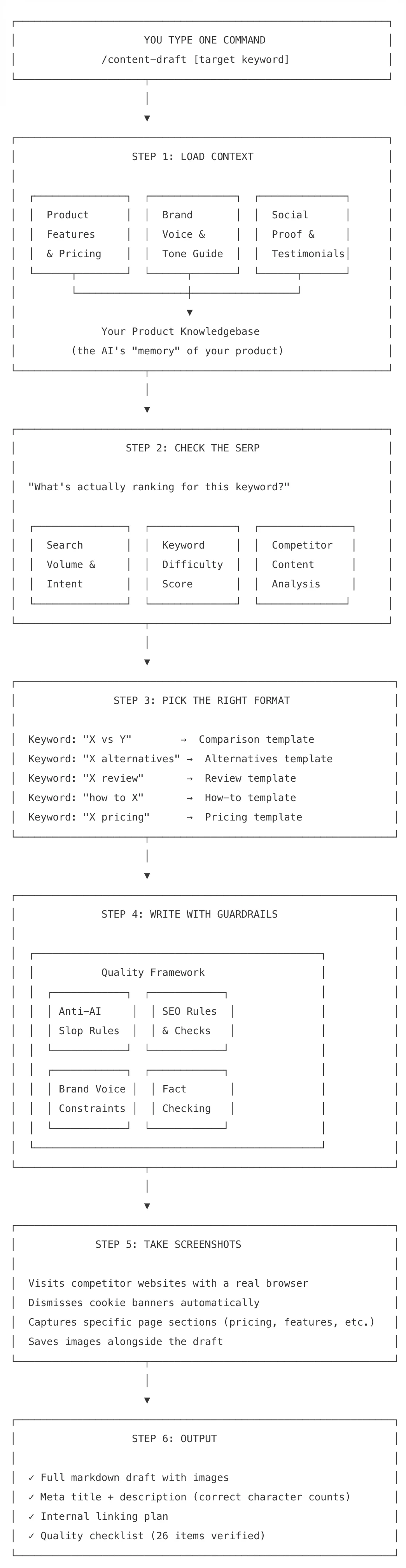
One command. Full draft. Screenshots included. No copy-pasting between 5 different tools.
Let me break down each piece, so you can follow.
Step 1: The Knowledgebase (Teaching AI Who You Are)
When you ask ChatGPT to write about your product, it hallucinates features, gets pricing wrong, and writes in a tone that sounds nothing like your brand. The fix isn't a better prompt. It's a knowledgebase: a set of files that the AI reads before writing anything.
Shoutout to Jim for building the initial version - he posted a guide you can follow to build yours.
Here's how I structured ours:
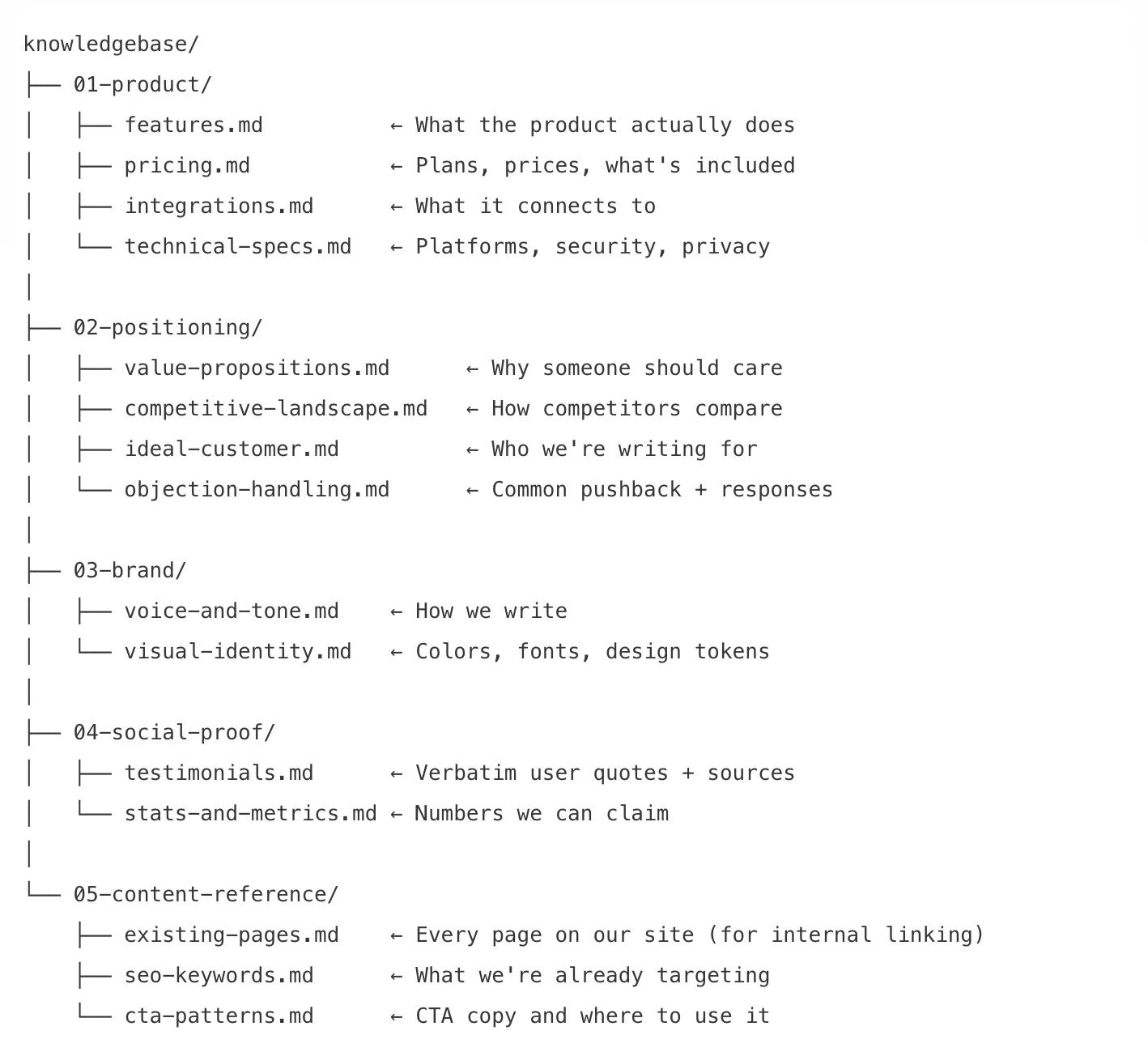
Note: They're specific, factual reference files. When the AI writes "Morgen integrates with Todoist," it's not guessing, it read that from integrations.md. When it quotes a user, it pulls the exact words from testimonials.md with the correct name and source link.
Step 2: SERP Analysis
Most content marketers pick a keyword, then write. This content automation workflow checks if you have content and how it's ranking first.
The AI pulls data from Ahrefs:
- Search volume - Is anyone searching for this?
- Keyword difficulty - Can we realistically rank?
- Current SERP - What type of content ranks? (Listicles? Comparisons? Reviews?)
- Top page word counts - How long should our article be?
- Related keywords - What else should we target on the same page?
Step 3: Article Templates (Yes you need repeatable structure)
Here's the worst thing you can do with AI: give it a keyword and say, "write a blog post."
That's like hiring a writer and saying, "write something about calendars." You'll get something, but it won't be what you need. Instead, build templates for each content type you publish. I tested this on the "boring" type of articles, and it works.
Each template needs to specify:
- Section order What goes where (H2s, H3s)
- Word count per section "Key Features: 800-1,200 words", not "write about features"
- What to include Screenshots, comparison tables, user quotes, pricing tables, CTAs
- Where your product goes Specify the number of mentions and the places where a competitor's limitation naturally leads to your strength
The AI picks the right template automatically based on the keyword pattern. "X vs Y" triggers the comparison template. "X alternatives" triggers alternatives. "How to X" triggers how-to.
Do I really have to?
Without templates, AI writes the same generic structure every time. With templates, every article type has a distinct flow that matches what readers (and Google) expect for that search intent.
TLDR: yes, you do.
Step 4: Quality check
There were times when I was getting the same opener or the same meta description. The quality framework is a set of rules the AI must follow, and a self-check it runs before finishing. You can adjust all of them, remember you're making this your own.
Banned phrases
These appear in roughly 90% of AI-generated content. I banned them entirely:
"game-changer," "seamlessly," "robust feature set," "in today's fast-paced world," "let's dive in," "it's worth noting that," "takes it to the next level," "comprehensive" (in any title), "ultimate guide" (anywhere)
Banned LLM patterns
Wikipedia's AI detection project identified writing patterns that are statistically overrepresented in AI text. You can download them, add them to your project, and tell AI to not do that. Some examples:
Significance puffery: "stands as a testament," "marks a pivotal shift," "underscores the importance." AI loves making everything sound historically significant. Banned.
Superficial -ing analysis: Sentences that end with "...making it ideal for teams" or "...helping users stay productive." These add no information. If you delete the -ing clause and the sentence still works, it was filler.
Uniform structure: Every feature gets exactly 150 words. Every section starts with "[Tool] offers..." This is the most obvious AI tell: real writers vary section depth based on what's interesting.
The AI Evaluation Checks
Before finishing, the system runs 8 tests on its own output and edits them:
- The swap test: Could you replace the product name with any competitor, and the sentence still works?
- The "so what" test: Does every section add information the reader didn't have? If not, cut it.
- The pattern test: Read the first sentence of every section in sequence. Do they follow a pattern? Break it.
- The filler test: Any sentence calling something "important" or "significant" without showing why? Delete it.
- The -ing test: Sentences ending with superficial -ing phrases? Remove the clause.
- The human editor test: Would Wirecutter publish this paragraph without changes?
- The read-aloud test: Does it sound like a person talking or a document being generated?
- The attribution test: Is every factual claim sourced, marked as opinion, or common knowledge?
Step 5: Automated Screenshots (Without cookie bar)
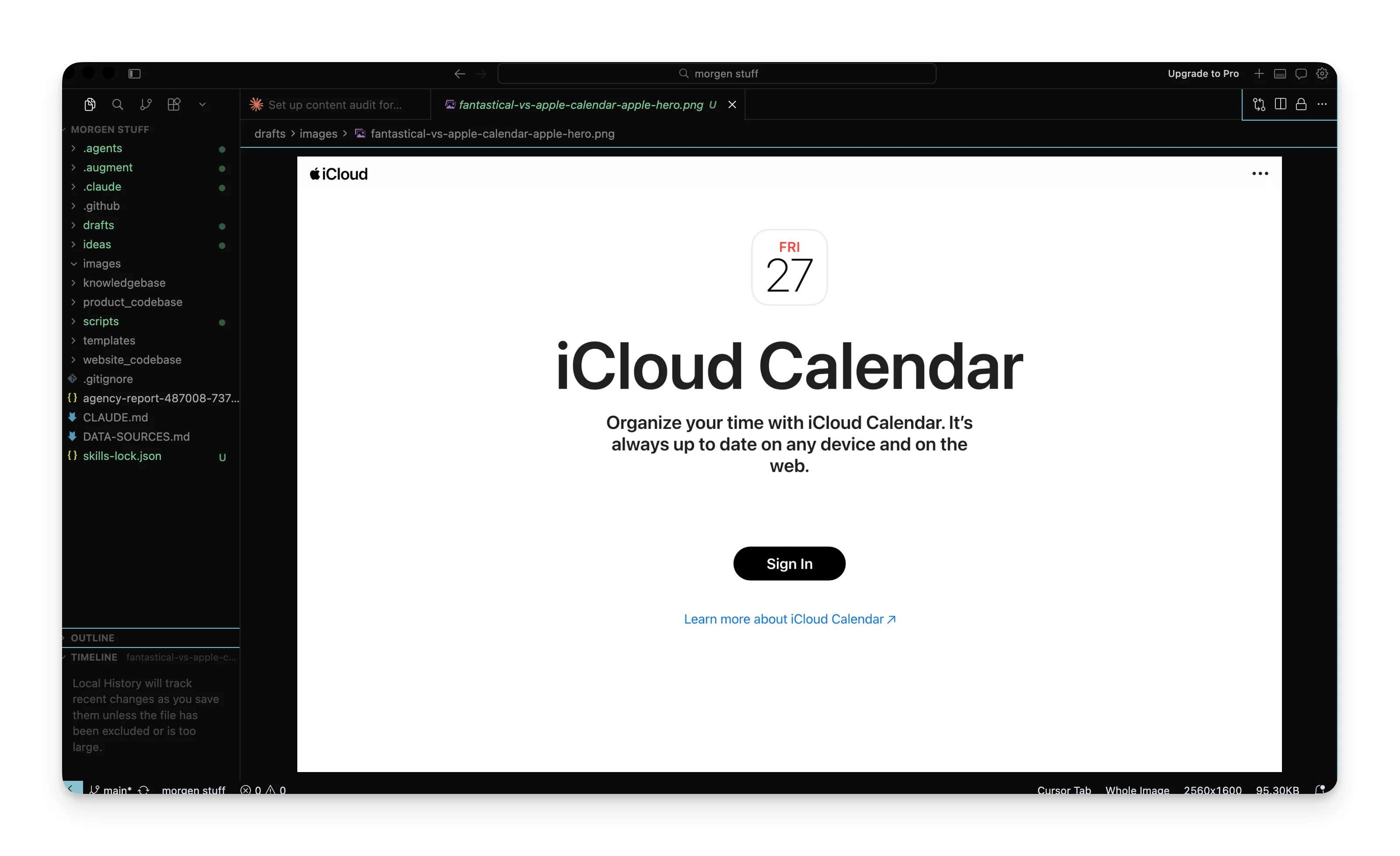
The problem
Comparison articles need screenshots. The competitor's pricing page, their homepage, their feature pages. Taking these manually means:
- Open each URL
- Dismiss the cookie banner
- Wait for it to load
- Take the screenshot
- Crop it
- Save it with the right filename
- Insert it into the draft
For an article with 4-6 screenshots, that's 20 minutes of work.
The solution: Playwright
Playwright is a browser automation tool. It opens a real Chrome browser, visits a website, interacts with it, and takes screenshots.
┌──────────────────────────────────────────────────────┐
│                 SCREENSHOT TOOL                      │
│                                                      │
│  Input: URL + output path + options                  │
│                                                      │
│  1. Open headless Chrome browser                     │
│  2. Navigate to URL                                  │
│  3. Wait for page to fully load                      │
│  4. Auto-detect and dismiss cookie banner            │
│  5. (Optional) Click buttons, scroll, wait           │
│  6. Capture screenshot                               │
│  7. Save to images/ folder                           │
│                                                      │
│  Cookie banners dismissed automatically:             │
│  "Accept" / "Accept All" / "Allow" / "I agree"      │
│  + OneTrust, GDPR banners, and common patterns      │
└──────────────────────────────────────────────────────┘
Advanced tricks
Screenshot just one section of a page (like a pricing table):
python3 screenshot.py https://flexibits.com/pricing images/pricing.png \
    --selector ".pricing-cards"
Click a tab before capturing (like switching to "Monthly" pricing):
python3 screenshot.py https://flexibits.com/pricing images/monthly.png \
    --click "button:has-text('Monthly')"
Scroll to a section below the fold, then capture it:
python3 screenshot.py https://flexibits.com/fantastical images/tasks.png \
    --scroll-to "text=Tasks" --selector "section:has-text('Tasks')"
Dark mode:
python3 screenshot.py https://example.com images/dark.png --dark-mode
No rate limits (it runs on your machine), no API costs, and no cookie banners in your screenshots.
PS: definitely possible to play with it and add a background etc.
Setup (5 minutes)
If you're using Claude Code or any terminal-based AI tool:
pip install playwright
playwright install chromium
That installs a headless Chrome browser on your machine. The Python script handles the rest.
Step 6: Putting It All Together
Here's the full content automation flow from keyword to finished draft:
┌───────────────┐     ┌──────────────┐     ┌──────────────┐
│ KNOWLEDGEBASE │     │  SERP DATA   │     │  ARTICLE     │
│               │     │              │     │  TEMPLATE    │
│ - Features    │     │ - Volume     │     │              │
│ - Pricing     │     │ - Difficulty │     │ - Structure  │
│ - Voice guide │     │ - Top pages  │     │ - Word count │
│ - Competitors │     │ - Intent     │     │ - Section    │
│ - Testimonials│     │ - Related KW │     │   order      │
└───────┬───────┘     └──────┬───────┘     └──────┬───────┘
        │                    │                     │
        └────────────────────┼─────────────────────┘
                             │
                             ▼
                 ┌────────────────────────┐
                 │    QUALITY FRAMEWORK   │
                 │                        │
                 │  Banned phrases        │
                 │  Anti-AI patterns      │
                 │  SEO requirements      │
                 │  Fact verification     │
                 │  Source attribution    │
                 │  Self-check tests      │
                 └───────────┬────────────┘
                             │
                             ▼
                 ┌────────────────────────┐
                 │    SCREENSHOT TOOL     │
                 │                        │
                 │  Playwright browser    │
                 │  Cookie dismissal      │
                 │  Element targeting     │
                 └───────────┬────────────┘
                             │
                             ▼
              ┌───────────────────────────────┐
              │       FINISHED DRAFT          │
              │                               │
              │  ✓ Markdown with images       │
              │  ✓ SEO meta tags              │
              │  ✓ Internal linking plan      │
              │  ✓ Quality checklist passed   │
              │  ✓ Ready for human editing    │
              └───────────────────────────────┘
TLDR: Build your MVP
You don't need to build all of this at once. Here's the order I'd recommend:
Step 1: Knowledgebase
Create three markdown files:
- features.md Every feature, described specifically
- competitors.md Top 3-5 competitors with pricing and gaps
- voice.md 10 "we say / we don't say" examples
Put them in a folder. When you prompt your AI tool, tell it to read these files first.
Step 2: Content templates
Pick your most common article type (probably comparison or review) and write the structure:
- Which H2 sections appear, in what order
- Word count per section
- Where screenshots go
- Where your product mention goes
- Where the CTA goes
Save this as a template file. Reference it in your prompt.
Step 3: Anti-slop rules
Write a list of:
- Phrases that are banned
- 5 structural rules (max paragraph length, visual breaks, section depth variation)
- The 8-point self-check
Include these in your prompt. The output quality jump from this step is dramatic.
Step 4: Screenshots + Setup
Install Playwright. Write (or copy) the screenshot script. Now your AI can grab product screenshots as part of the writing flow.
Step 5: Connect everything
Talk with Claude about the output, the steps it should take 1-2-3-4, and don't forget to connect your Ahrefs API/MCP for the keyword analysis part.
This is not the end
This system doesn't write publishable articles. It writes editable drafts.
Also, a reality check: This will NOT get you rank #1 nor be cited in LLMs. This will enable you to move a bit faster, and create a system that supports your efforts.
From 16h+ to better.
A first draft from ChatGPT needs 4 hours of rewriting: fact-checking, restructuring, removing AI slop, adding screenshots, and fixing the tone. A first draft from this system needs 30-45 minutes of editing, mostly adding nuance, tightening language.
This is not "AI writes my content." It's "AI handles the 70% that's tedious, so I can focus on the 30% that requires judgment."
The knowledgebase ensures accuracy. The templates ensure structure. The quality framework catches slop. The screenshot tool handles the grunt work. And the SERP analysis makes sure you're writing something people search for.
None of these pieces are complicated on their own. The leverage comes from wiring them together so they run in sequence from a single command.
I made this, because competitor articles need to be factual, and are, at this time, necessary to get you in the game + so you can focus on other BOFU content that's giving value and experience.